
Heap
Overview
Heap (by Contentsquare) is a digital analytics platform that automatically captures user interactions—clicks, form submissions, and page views without manual event tracking.
VWO Feature Experimentation (FE) sends feature-flag and event data to Heap. This allows you to see which feature flag variations users are exposed to directly within your Heap reports. By correlating user behavior with specific experiments, you can gain deeper, data-driven insights into the real impact of your feature rollouts and campaigns.
Prerequisites
1. Heap Account Setup
- Create a Heap account at heap.io if you don't already have one.
- Create a new project in your Heap dashboard
- Obtain your Heap App ID from your project settings (Account > Manage > Projects)
- Add your Heap App ID to your application's environment or constants file
HEAP_APP_ID=your_heap_app_id Note: Heap provides two environments - Production and Development. Ensure you use the correct App ID for the environment you want to send data to.
2. VWO FE SDK Configuration
- Ensure VWO Feature Experimentation is enabled in your VWO account.
- The VWO FE SDK should be properly installed in your project.
- Locate your Account ID and SDK Key in the VWO dashboard.
- Set your VWO account ID and SDK key in your application's environment or constants file.
Integration Steps
Integrating the VWO FE SDK with analytics platforms like Heap allows you to automatically send feature flag evaluation and event tracking data to your analytics dashboard.
NoteThe example below shows an implementation with the
NodeSDK. Please note that any VWO FE SDK can be used.
1. Install Dependencies
Install the VWO FE Node SDK. No additional Heap SDK is required as we use the Heap Track API.
npm install vwo-fme-node-sdk2. Create a Helper for Sending Data to Heap
Create a helper function to send data to Heap's server-side Track API.
const HEAP_APP_ID = process.env.HEAP_APP_ID;
const HEAP_TRACK_ENDPOINT = 'https://heapanalytics.com/api/track';
// For EU data residency, use: 'https://c.eu.heap-api.com/api/track'

function sendToHeap(eventName, identity, properties) {
  fetch(HEAP_TRACK_ENDPOINT, {
    method: 'POST',
    headers: { 'Content-Type': 'application/json' },
    body: JSON.stringify({
      app_id: HEAP_APP_ID,
      identity: identity,
      event: eventName,
      properties: properties,
    }),
  }).catch((err) => console.warn('[Heap] failed:', err.message));
}

module.exports = { sendToHeap };
3. Initialize VWO SDK and Set Up the integrations.callback
Provide an integrations.callback when initializing the FE SDK. integrations.callback is a mechanism that automatically forwards FE SDK events (like flag evaluations) to the desired analytics platform for real-time tracking and analysis. Inside the callback, check the properties to determine if it's a flag evaluation or an event tracking call and forward the data to Heap.
const { init } = require('vwo-fme-node-sdk');
const { sendToHeap } = require('./heapIntegration');

const vwoClient = await init({
  sdkKey: process.env.FE_SDK_KEY,         // Replace with your actual VWO SDK key
  accountId: process.env.FE_ACCOUNT_ID,   // Replace with your actual VWO account ID
  integrations: {
    callback(properties) {
      if (properties.featureName) {
        // flag evaluation
        sendToHeap('VWO_getFlag', properties.userId, {
          featureName: String(properties.featureName || ''),
          featureId: String(properties.featureId || ''),
          featureKey: String(properties.featureKey || ''),
          experimentId: String(properties.experimentId || ''),
          experimentKey: String(properties.experimentKey || ''),
          experimentVariationId: String(properties.experimentVariationId || ''),
          rolloutId: String(properties.rolloutId || ''),
          rolloutKey: String(properties.rolloutKey || ''),
          rolloutVariationId: String(properties.rolloutVariationId || ''),
          isUserPartOfCampaign: String(properties.isUserPartOfCampaign || ''),
          isPartOfHoldout: String(properties.isPartOfHoldout || ''),
          isHoldoutPresent: String(properties.isHoldoutPresent || ''),
          holdoutIDs: JSON.stringify(properties.holdoutIDs || []),
          customVariables: JSON.stringify(properties.customVariables || {}),
          variationTargetingVariables: JSON.stringify(properties.variationTargetingVariables || {}),
        });
      } else if (properties.api === 'trackEvent') {
        // event tracking
        sendToHeap('vwo_fme_track_event', 'anonymous', {
          eventName: String(properties.eventName || ''),
        });
      }
    },
  },
});
Integration Data
The integrations.callback receives a properties object containing details about the VWO SDK action:
For flag evaluations (i.e. getFlag):
{
  "featureName": "yourFlagName",
  "featureId": 5,
  "featureKey": "yourFlagKey",
  "userId": "UserId",
  "api": "getFlag",
  "rolloutId": 789,
  "rolloutKey": "rollout_checkout",
  "rolloutVariationId": 1,
  "experimentId": 321,
  "experimentKey": "exp_checkout_test",
  "experimentVariationId": 2,
  "isUserPartOfCampaign": true,
  "isPartOfHoldout": false,
  "isHoldoutPresent": false,
  "holdoutIDs": [],
  "customVariables": { "plan": "premium" },
}
For event tracking (trackEvent):
{
  "eventName": "yourEventName",
  "api": "trackEvent"
}
Ensure you have added your Heap App ID to your environment or constants file as specified in the Prerequisites.
This setup ensures that every time a feature flag is evaluated or an event is tracked by the VWO SDK, the relevant data is automatically sent to your configured Heap project.
Sample Screenshot
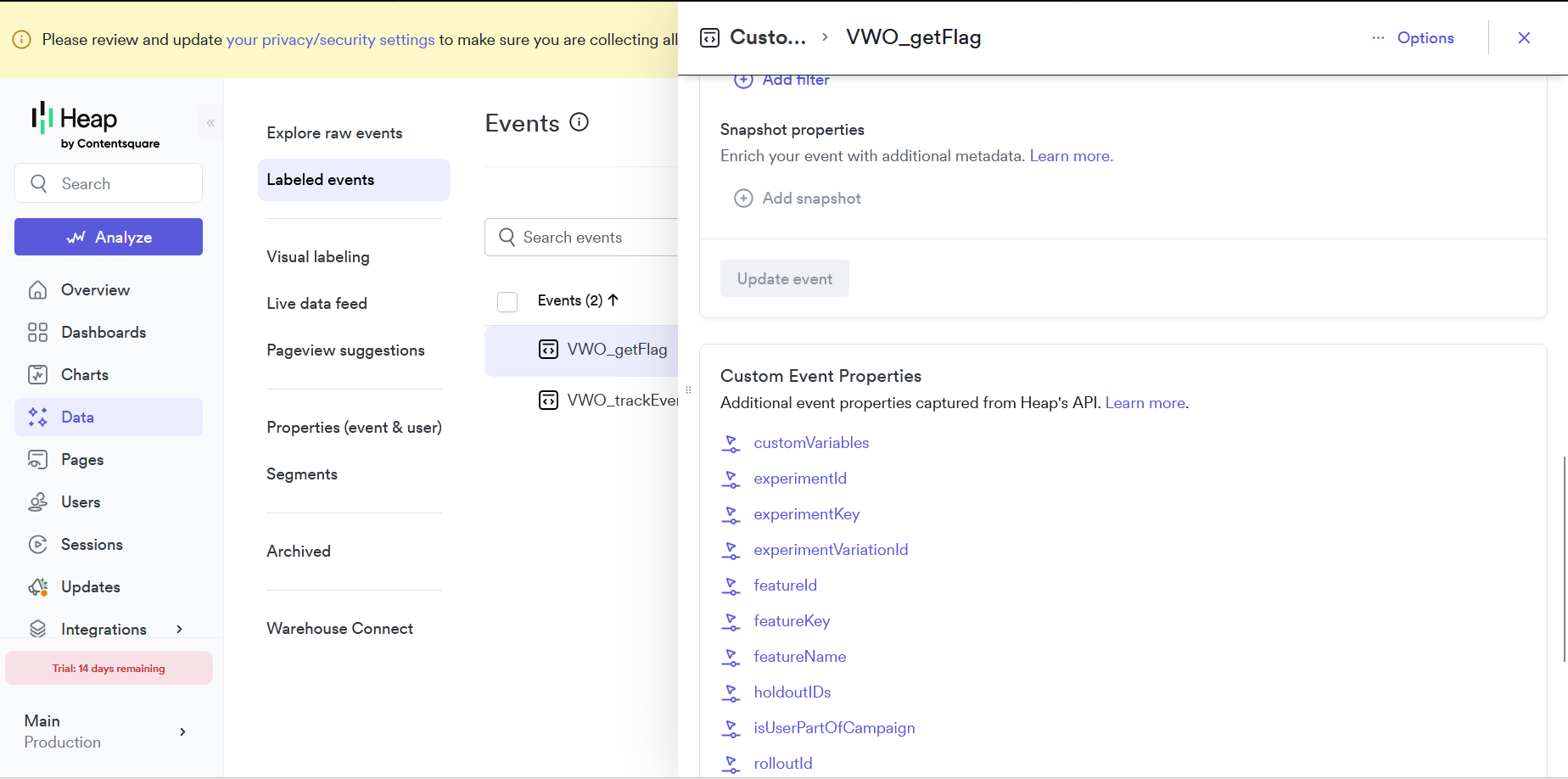
Labeled Events — VWO_getFlag event with custom event properties:
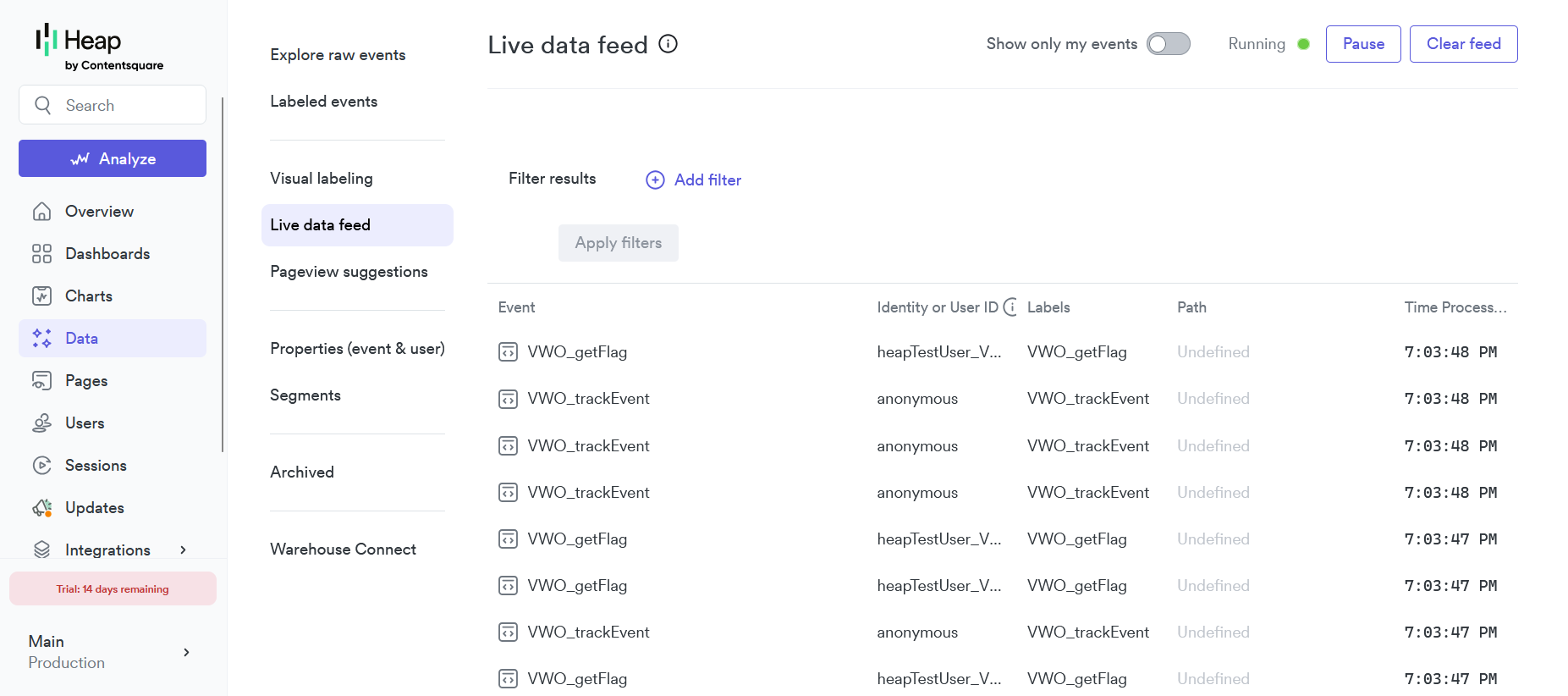
Live Data Feed — Real-time VWO events with user identities:
How to See the Data in Heap
After integrating Heap with your application, you can view the tracked data in the following ways:
-
Access Heap Dashboard:
-
Log in to your Heap account at heap.io
-
Navigate to your project dashboard
-
Ensure you are in the correct environment (Production or Development)
-
-
View Feature Flag Evaluations:
- Go to Data > Labeled Events
- Look for events named
VWO_getFlag - Click on the event to see custom properties like
featureKey,experimentId,experimentVariationId.
-
Track Custom Events:
- Find events named
VWO_trackEvent - These events include details about the tracked event name
- Find events named
-
View Real-Time Data:
- Go to Data > Live Data Feed
- See VWO events arriving in real-time with user identities and labels
-
Analyze Data: Use Heap's analytics tools to:
- Create custom charts and funnels using VWO events
- Segment users by experiment variation
- Track conversion rates across feature flag variations
- Monitor feature flag performance in real-time
Updated about 1 month ago